A webstory is the unit of news on the ELIXIR-UK site. This page covers how to structure one and what artifacts to ship alongside it (title, excerpt, slug, social posts, banner image).
Length
| Format | Body length | When to use |
|---|---|---|
| Short announcement | 80-150 words | Service joins, deadline reminders, single-fact news |
| Standard webstory | 250-400 words | A paper, an event recap, a partnership, a new programme |
| Long article / report | 700-2,000 words | Community write-ups, multi-section reports, deep dives |
If the body is shorter than 80 words, it probably belongs in the newsletter or on social – not as a standalone webstory.
Shape of the body
The inverted pyramid. Lead with the most important thing; let everything else taper down.
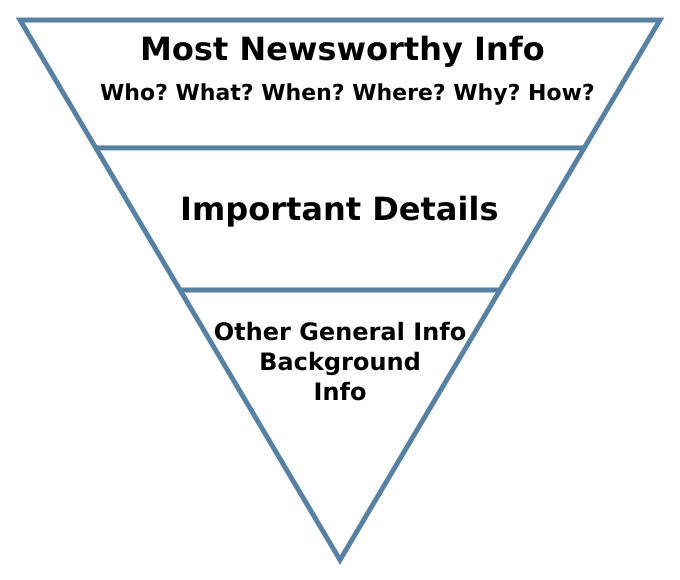
Inverted pyramid for news writing. Redrawn by Makeemlighter from an original by the US Air Force Departmental Publishing Office. File on Wikimedia Commons – public domain.

- Lead (1-2 sentences). Answer who, what, why this matters – in plain English. Lead with the substance: the paper, the person, the event, the tool. Not with ELIXIR-UK.
- Context (1-2 short paragraphs). What’s the background? Who built it? Who funded it? Where does it fit?
- Quote (optional). One quote from a named person with their role. Not three quotes saying the same thing.
- ELIXIR-UK frame (1-2 sentences). Why is this story on the ELIXIR-UK site? Answer that explicitly and concisely.
- Next action (1 line). A link, a contact, a deadline, an invitation. Never a “thank you” or a “watch this space”.
The bundle: every webstory ships with these
Each webstory is a bundle of artifacts that get reused across channels.
| Artifact | What it is | Length | Used for |
|---|---|---|---|
| Body | The webstory itself | 250-400 words | The webstory page |
| Title | The headline | ~60 characters | Page title, browser tab, SEO, social shares |
| Excerpt | The reusable one-sentence summary | 1-2 sentences, ideally ≤160 characters | Newsletter (via RSS feed), SEO meta description (default), cards, related-pages lists, LinkedIn hook context |
| Meta description | SEO description | ~150-160 characters | Auto-populated from the excerpt. Only write a separate one if you want to override it for SEO reasons. |
| URL slug | The path segment | 3-6 words, hyphenated | The webstory’s URL |
| Banner image + alt text | Image at the top of the page and its description | Alt text: ~125 characters | The webstory page, social cards |
| LinkedIn post | LinkedIn variant | Hook + 3-4 bullets + link + 3-5 hashtags | |
| Bluesky post | Bluesky variant | One hook + one context line + link + 2-3 hashtags | Bluesky |
Title
- ~60 characters – longer titles get truncated in Google results and on social cards.
- Lead with the substance. “Health Data Research Gateway joins ELIXIR-UK Services” beats “Big news from ELIXIR-UK”.
- Sentence case. Proper nouns and service names keep their own capitalisation.
- No clickbait, no question-headlines designed to provoke.
Excerpt
- The most important reusable artifact in the bundle. It populates the newsletter (via the site’s RSS feed), the SEO meta description (auto-derived unless overridden), the card grid, related-pages lists and the LinkedIn hook context. Write this once, well.
- One tight sentence. Two only if the second sentence does real work.
- Ideally ≤160 characters so it can double as the SEO meta description without truncation. Slightly longer is fine if the context demands it; just write a separate, shorter meta description in that case.
- Lead with the substance, not the institution.
- Example, from the Safe People Registry webstory:
“Members of the ELIXIR-UK Human Data Community highlight the soft launch of the Safe People Registry, an open-source tool developed by HDR UK to support consistent ‘safe people’ assessment for access to sensitive data.”
Meta description
- Auto-populates from the excerpt. In most cases you don’t need to touch it.
- Override only when: the excerpt is longer than ~160 characters and gets truncated; the excerpt is good for the newsletter but not optimised for search; or you want to tune for a specific search query.
- ~150-160 characters. One sentence.
URL slug
- 3-6 words, hyphenated, lowercase.
- Describe the subject, not the publication context. “safe-people-registry-soft-launch” beats “news-2026-may-soft-launch”.
- Avoid years and dates in the slug unless they are part of the subject (e.g. “all-hands-2025-ai-report”).
Body
- 250-400 words (see Length for other formats).
- One H1 (the title – set automatically by the page frontmatter).
- Use H2s sparingly – a 300-word webstory rarely needs sub-headings. Long articles do; standard webstories don’t.
- One paragraph per idea. Short paragraphs read better online.
Banner image and alt text
- Every webstory ships with a banner image at the top of the page.
- We have a news banner template for webstory banners – use it as the starting point. The same image also gets attached to the LinkedIn post (see Writing for social for how it’s used there).
- For sourcing, style and treatment of images, see Brand → Imagery. The voice rules don’t cover visual choices; the brand section does.
- Alt text describes the image for screen readers and search engines. ~125 characters.
- Lead with the most important visual fact. “Attendees in discussion during the ELIXIR-UK All Hands 2025 at Sandy Park, Exeter” beats “A photo from the event”.
Social media and newsletter copy
LinkedIn post
The form, derived from your existing on-brand posts:
[Hook line. Often opens with a coloured-bullet emoji (🟠) for thematic posts.]

[1-2 sentences of context.]

🟠 [Sub-point 1]
🟠 [Sub-point 2]
🟠 [Sub-point 3]

🔗 [link to the webstory]
#Hashtag1 #Hashtag2 #Hashtag3
- 3-5 hashtags. Mix one community hashtag (#ELIXIRUK) with topic-specific ones.
- Tag relevant institutions and people with @ where possible.
Bluesky post
Tighter than LinkedIn. The form:
[One hook line – the excerpt usually works.]

[Optional: one line of context.]

🔗 [link]
#Hashtag1 #Hashtag2
- 2-3 hashtags.
- Under 300 characters total.
Newsletter blurb
There usually isn’t one to write – the weekly digest newsletter pulls each item from the site’s RSS feed, which uses the excerpt. If the excerpt is good, the newsletter blurb is good.
The only time to write something separate is for a single-topic newsletter (where the webstory is one of two or three items): start with the excerpt, then add a sentence of direct second-person framing if the context calls for it (“If you missed it earlier this week…“).
Other things to consider
Quotes
- One quote per webstory, two at most for longer pieces. Three quotes saying the same thing is filler.
- Format: full name, role, organisation. “Dr Allyson Lister, FAIRsharing Content and Community Coordinator, says:” then the quote on its own line or in a blockquote.
- Use direct speech only when you genuinely have the quote. Don’t make up paraphrased “quotes”.
Linking
Use links sparingly. One well-placed link at the end of the piece is more useful than a dozen scattered through the body – inline links pull the reader’s attention away from your sentence and rarely bring them back. Treat links as a navigation aid, not as decoration. Avoid the “Christmas tree” effect.
Default form: a single “Find out more” or “Read more” line near the end of the piece, pointing to the canonical source. That’s usually all you need.
When to link inline: only when the link IS the substance of the sentence – a person’s name pointing to their profile, a paper title pointing to the DOI, a service name pointing to its ELIXIR-UK page. If the sentence still reads cleanly without the link, leave it out.
External links (anything off the ELIXIR-UK site):
- Open in a new tab. In the WordPress editor, tick “Open in new tab” when inserting the link.
- Set the rel attribute to
noopener noreferrer nofollow. WordPress setsnoopener noreferrerautomatically when you tick “Open in new tab”; addnofollowmanually in the link’s advanced options. noopener noreferrerprotects the reader (security and privacy).nofollowtells search engines we are not vouching for the destination’s SEO weight.
Internal links (to other ELIXIR-UK pages): open in the same tab. No rel attributes needed.
Link text describes the destination. The whole verbal phrase is the link, not just “click here” at the end of a sentence. Never “click here”, “this page” or “read more about it here” – they’re meaningless when lifted out of context, and useless for screen readers that announce a page’s links as a flat list.
✗ To read the published article click here
Papers: link via the DOI (https://doi.org/…), not the journal landing page – DOIs are persistent, journal URLs are not.
Publishing in WordPress
Two things to set when you publish, in addition to the body and the artifact bundle: the category (in the right-hand sidebar) and the relationship fields (in the About Stories panel below the editor).
Choose the category
In the right-hand sidebar of the editor, set the post category. Pick one:
- News – standard community webstories. Service announcements, paper highlights, partnership news, member updates. Most pieces sit here.
- Article – longer-form pieces. Reports, community write-ups, multi-section deep-dives (e.g. the All Hands AI insights summary).
- Blog – personal or opinion pieces from named contributors. Less common; usually from a specific person rather than from ELIXIR-UK as an institution.
- Press release – formal releases aimed at journalists and the science press. Major service launches, funding wins, partnerships you actively want picked up by external media. Press releases include the ELIXIR-UK boilerplate and press contact in the Notes to editors field (see below).
The category controls two things: which page template is used to render the post (News, Article, Blog and Press release each have their own layout) and where the piece appears in site listings. Picking the wrong category gives you the wrong layout, not just the wrong shelf – so it really matters.
Relationship fields (About Stories panel)
Scroll below the editor to the About Stories panel. It uses the Advanced Custom Fields (ACF) plugin to expose relationship fields that link your webstory to other entries on the site – people, members, services, events. These connections are the reason your webstory shows up on the right Service page, the right People profile, the right Event page. Skipping them turns the webstory into an orphan.
Fill in every field that applies. Leave blank only when there is genuinely nothing to link.
Additional content
| Field | What to put |
|---|---|
| Subtitle | A one-line standfirst that appears under the title on the published page. Often the meta description shortened, or a second-line context hook. |
| Notes to editors | The press-release boilerplate: the standard “About ELIXIR-UK” paragraph plus press contact. Auto-added by the Press release template – you don’t fill it in manually. The text comes from Boilerplate. If it ever needs changing, edit the WordPress Press release template (not individual posts), and update Boilerplate so they stay in sync. |
People, Members and Collaborators
| Field | What to link |
|---|---|
| Related people | ELIXIR-UK People profiles mentioned in the webstory – authors of a paper, named members, event speakers. |
| Related Members | ELIXIR-UK Member institutions mentioned in the webstory. |
| Other organisations | Non-member organisations mentioned – funders, collaborating institutions, partner projects outside ELIXIR-UK. |
Projects and services
| Field | What to link |
|---|---|
| Related projects | ELIXIR-UK Project pages mentioned in the webstory. |
| Related Services | ELIXIR-UK Service pages mentioned (FAIRsharing, WorkflowHub, KnetMiner, etc.). |
Events and other activities
| Field | What to link |
|---|---|
| Related Events | Event pages – All Hands, workshops, conferences. |
| Related Activities | Other activities – Community Calls, Contentathons, working group meetings. |
Press release boilerplate
For posts in the Press release category, the Notes to editors field carries the standard “About ELIXIR-UK” paragraph plus the press contact. It’s auto-populated by the Press release template – you don’t fill it in manually on each post.
The canonical text lives on the Boilerplate page in the Brand section. If it ever needs updating, the change has to happen in the WordPress Press release template (not in individual posts) – and on the Boilerplate page – so the two stay in sync.
Worked example: the full bundle
The Safe People Registry piece (lightly paraphrased) as a complete bundle.
Title: Checking the paperwork: the Safe People Registry soft launch
Excerpt: Members of the ELIXIR-UK Human Data Community highlight the soft launch of the Safe People Registry, an open-source tool developed by HDR UK to support consistent ‘safe people’ assessment for access to sensitive data.
Meta description: Auto-populates from the excerpt. No separate writing needed.
URL slug: safe-people-registry-soft-launch
Banner alt text: A laptop screen showing a researcher profile page on the Safe People Registry platform.
LinkedIn:
🟠 Who is qualified to access sensitive data?
Members of the ELIXIR-UK Human Data Community have highlighted the soft launch of the Safe People Registry, an open-source tool developed by HDR UK to support consistent ‘safe people’ assessment for secure access to sensitive data.
The Registry streamlines processes used across Trusted Research Environments (TREs), Secure Data Environments (SDEs) and Safe Havens, reducing duplication for data custodians.
🚨 The team is welcoming expressions of interest from UK-based organisations to trial the system.
🔗 Learn more: [link] #TREs #SDEs #SafeHavens #HealthData #ELIXIRUK
Bluesky:
Who is qualified to access sensitive data?
HDR UK’s Safe People Registry is welcoming trial projects from UK-based organisations.
🔗 Learn more: [link] #TREs #SafeHavens
Newsletter blurb (weekly digest): The newsletter pulls this automatically from the excerpt via RSS, plus a “Read more” link. No separate writing needed.